
 latiyal
Introduction
If you are creating a cricket score application or sports website, having relevant data is essential in giving you all-inclusive information about a cricket match, including live scores, status of the match, statistics of players, scorecard, and ball-by-ball updates.
The trial version will let you use the API during live matches and see how rapidly information is processed and how promptly data is refreshed, how accurate it is, and if it is suitable per your app's requirements or if you are satisfied with the API's performance, then you can confidently integrate it into your cricket application.
In this article, we provide you with free cricket API options available for selection, evaluate most common scenarios for usage of such APIs, give a product methodology on how to test and implement free APIs.
5 Best Free Cricket Live Score APIs to Try in 2026
Here are five cricket API options developers can explore in 2026.
1. Latiyal Cricket API
The Latiyal Cricket API is suited for companies, startups and developers making Cricket score apps, websites and sports platforms. It provides cricket information such as live scores, scorecards, match information and updates in real time.
If you want to take a test run of a cricket API before opting for a paid plan, you can use a free trial which will allow you to check the speed and reliability of the cricket score application.
The performance can be judged against your application requirements before a plan is opted for. Before integration, check the available API endpoints, supported competitions, data coverage, request limits, and pricing based on your project's needs.
2. CricAPI (Now CricketData.org)
CricAPI (an entity of CricketData.org) is now offering the Cricket Data API to the developers with live scores, match summaries, player statistics and league fixtures. You would get free tier access, which is of good use in testing the API if before upgrading for a paid plan. The daily limit of API access under the free plan is 100, paid plans provide more hits.
Developers can use the free access to try out how the API responses work and determine what data is available for their application.
3. EntitySport Cricket API
EntitySport provides structured sports data APIs, including cricket data. It can be considered by developers building mobile applications, websites, scoreboards, and sports platforms.
Its cricket API provides structured data that developers can integrate into their applications. Depending on the plan, available data may include matches, teams, players, scorecards, and other cricket information. Developers should compare the available trial or free access with their expected API usage and data requirements.
4. Sportmonks Cricket API
Sportmonks Cricket API supplies structured cricket information for apps requiring live scores, ongoing play info, scorecards, players’ stats, fixtures, teams, and match details. Presently, Sportmonks has a free plan for testing, as well as a 14-day trial for receiving paid cricket service.
Best for: Cricket apps, sports platforms, developers, testing, and applications that need structured live cricket data.
Key points: Live scores, ball-by-ball data, scorecards, player and team information, fixtures, documentation, and scalable plans.
5. Cricket APIs on RapidAPI
RapidAPI is a marketplace where developers can discover and test different cricket APIs from multiple providers. Some APIs offer free or basic free plans, while others are freemium or paid. Therefore, the available cricket data, request limits, pricing, and features depend on the individual API provider.
Best for: API experimentation, development, prototypes, and comparing different cricket API options.
Key points: Numerous cricket APIs, various data sources, adaptable plans, API documentation, and testing methods. Each API’s coverage data should be checked before usage in a production.
Read Also - Real-Time Cricket Data For Smart TVs & OTT Platforms: Integration Challenges & Solutions
Guide To Compare Free Cricket API: Features, Limits And Best Usage Scenarios
How will you choose the top free cricket API for your application? Selecting a free cricket API is reliant on your app's objectives and data needs. For development, testing, prototypes, and small projects, you can utilize free APIs to obtain data. However, each project has unique requirements. A simple prototype may only need fundamental match details, while a production-level cricket score application might demand higher thresholds, quicker updates, wider tournament coverage, and specialized support. They need high limitations to access API or requirements.This API comparison chart makes it easier to choose the most productive solution.
| Cricket API | Free / Trial Access | Best For | Key Features |
| Latiyal Cricket API | Free Trial | Cricket Apps & Startups | Live scores, scorecards, match data, real-time updates |
| CricketData.org | Free Plan / Trial | Prototypes & Small Projects | Live scores, schedules, player & match data |
| Sportmonks Cricket API | Free Access / Trial Options | Developers & Testing | Live scores, ball-by-ball data, player stats, fixtures |
| EntitySport Cricket API | Free Development Access | App Development & Testing | Matches, teams, players, scorecards & cricket data |
| RapidAPI Cricket APIs | Depends on API Listing | API Testing & Experimentation | Multiple cricket APIs, endpoints & developer tools |
Tip: Free API limits, features, and trial conditions can change. Always make sure to check current provider documentation and pricing before integrating API into your production application.
How to Use a Free Cricket Live Score API for Your App
Using a free live cricket score API is probably not complicated. It usually consists of provider selection, obtaining access to API, selecting data, integrating the API, and displaying live information in your application.
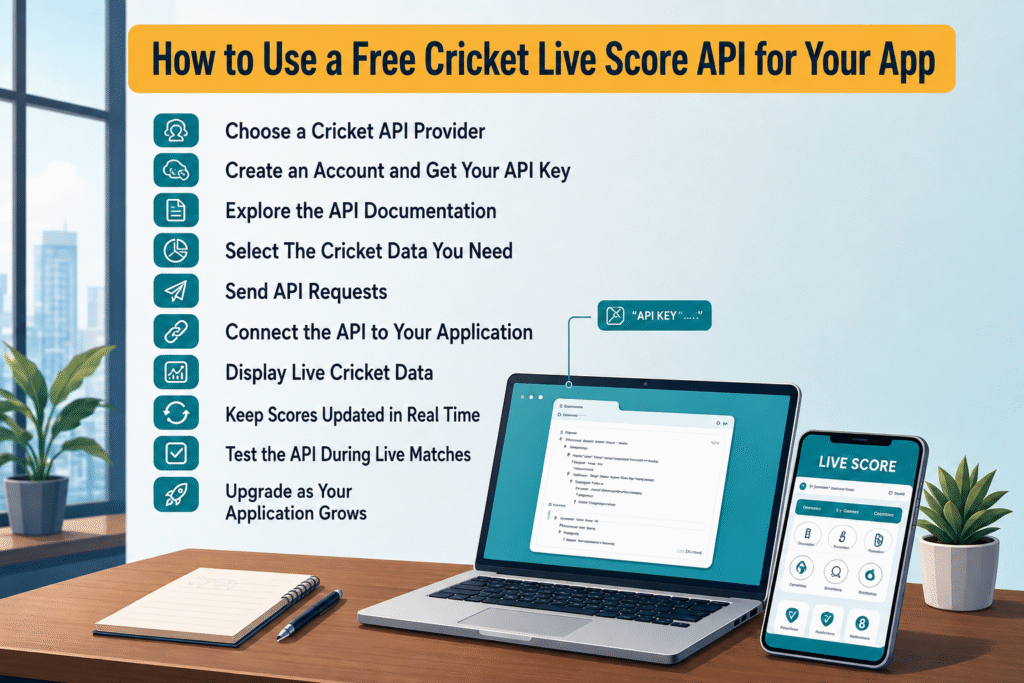
1. Choose a Cricket API Provider
Start by comparing cricket API providers based on data accuracy, update frequency, match coverage, API limits, reliability, documentation, and pricing.
If you are building a commercial cricket application, also check whether the provider's free plan or trial permits commercial testing and usage.
2. Create an Account and Get Your API Key
Register with your selected API provider and obtain the API key which is commonly used to verify requests and identify the application you are using. It is important to keep the API key under wraps and not having it written in publicly available frontend code.
3. Explore the API Documentation
Before integration, review the provider's documentation to understand:
- Available API endpoints
- Authentication method
- Request parameters
- Response structure
- Rate limits
- Error handling
- Integration examples
Good documentation can make the development process much faster and easier.
4. Select the Cricket Data You Need
Choose the endpoints according to your application's features. Common cricket API endpoints include:
- Live matches
- Upcoming fixtures
- Match results
- Live scorecards
- Ball-by-ball data
- Teams and players
- Player statistics
- Tournament information
For a basic live-score app, live match data and scorecard endpoints may be the most important.
5. Send API Requests
After processing the request, the API sends back the required cricket details. Nearly all cricket APIs use JSON during the communication process, which makes processing the request comfortable irrespective of the programming language used.
6. Connect the API to Your Application
You can use the cricket API with different technologies – Flutter, Android, iOS, React, Node.js, PHP, and Python. Your application receives the API response, processes it, and links it to your UI.
7. Display Live Cricket Data
Once the data is received, you can display it through different application features, including:
- Live scoreboards
- Match centers
- Cricket scorecards
- Ball-by-ball commentary
- Player statistics
- Team information
- Match schedules
The presentation depends on your application's design and the data available through the selected API.
8. Keep Scores Updated in Real Time
A cricket application will need timely information about match updates. Depending on the API used, the application could use techniques like polling, webhooks, and WebSockets to know the score and about match events in real time.
The best approach may vary depending on API capabilities, traffic pattern, and the speed with which your app needs to show the information.
9. Test the API During Live Matches
Before launching your application, test the API with real matches. Pay attention to:
- Score update speed
- Data accuracy
- Response time
- API stability
- Match coverage
- Request limits
- Error handling
Testing with live match data can help identify integration problems before users encounter them.
10. Upgrade as Your Application Grows
A free cricket API can be useful for testing, prototypes, and early-stage development. However, growing applications may require higher request limits, broader data coverage, faster updates, or additional support.
When your traffic increases, compare paid plans and choose an API solution that can support your application's long-term requirements.
Read Also- How To Choose The Best Cricket Live Line API In 2026: A Complete Guide
What to Check Before Choosing a Free Cricket API?
The word “free” should not be the only reason you choose an API. Don’t just go for an API because it’s free. Check out these factors before implementing.

Data Accuracy
Live cricket applications depend on accurate information. Incorrect scores, player details, or match statuses can reduce user trust.
Update Speed
Users expect live scores to change quickly. Check how frequently the provider updates its data and test the response during an active match.
Match and Tournament Coverage
Ensure that the API supports the leagues, tournaments, teams, and matches suitable for your users.
API Limits
Verify the daily/monthly usage cap, the number of requests allowed per minute, and all other constraints. A free plan that is good for testing purposes could be insufficient once you have a lot of users.
Documentation
Good documentation describes in detail API endpoints, authentication, parameters, response formats, and API integration examples.
Scalability
If your application becomes successful, the traffic on the API can grow significantly. Pick a company that provides a proper upgrade path.
Reliability and Support
If you are creating a production app, uptime and tech support are important. Consider how good the company is at dealing with errors, service outages, and developer requests.
Commercial Usage
If you plan to monetize your app, verify the company's licensing and commercial use terms.
Conclusion
A no-cost cricket API is a good starting point for developers who want to create cricket score applications, websites, scoreboards, analytics platforms, and various cricket-based products. However, when choosing a provider, the choice should not be made only based on the free quota being available; it is worth paying attention to other points as well, including data accuracy, update speed, match and tournament coverage, reliability, limits of the API, scalability, documentation, support, and ability to use the data commercially.
The best way to find a suitable provider is to compare all the options available with your use cases and test the API using real live match data before integration. During the period of testing or free trial, you should measure such parameters as response time, quality of data, reliability, coverage, and requirements for integration.
If you are interested in Latiyal Cricket API, you will be able to take advantage of a free trial to analyze how live data matches your specific application requirements. After your application becomes successful, you are to switch to one of the premium plans that suit your traffic, data requirements, and long-term objectives.